Nginx工作原理全解析:从请求到响应的完整旅程
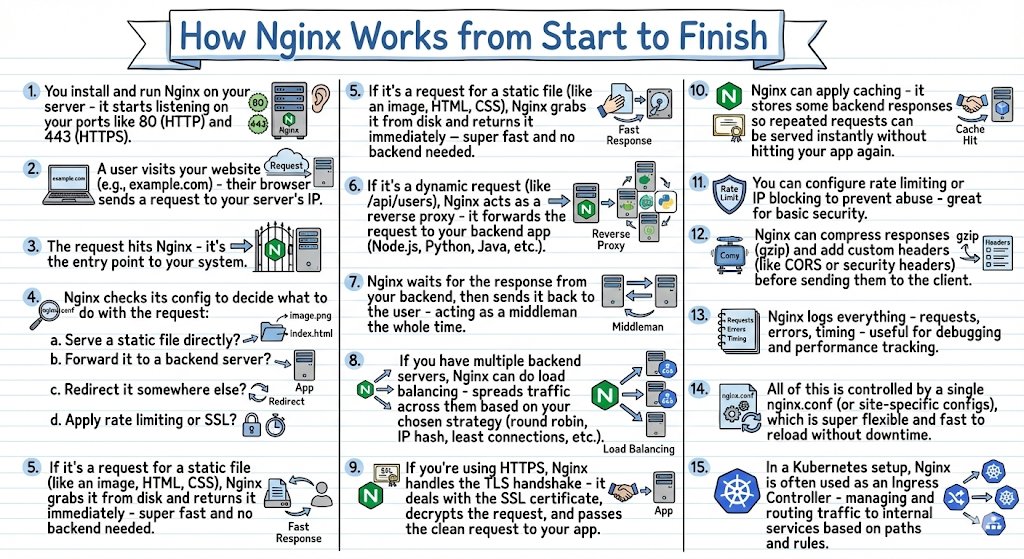
nginx.jpeg

开场:那台永不宕机的服务器

2019年,我加入一家电商公司,第一天就听到一个传说:“我们的Nginx服务器三年没重启过,每秒处理10万请求,CPU占用不到20%。”

我当时不信。一台服务器,怎么可能这么猛?

后来,我真正理解Nginx的时候,我才知道:这不是传说,这是现实。

今天,全球前1000万个网站中,超过30%在用Nginx。Netflix、Airbnb、GitHub、WordPress.com……这些你天天在用的网站,背后都是Nginx。

它为什么这么受欢迎?它是如何工作的?让我们从一个HTTP请求的完整生命周期说起。


第一章:Nginx的启动——万事俱备

Step 1: 安装并启动Nginx

当你第一次在服务器上运行:

1
2
sudo apt install nginx
sudo systemctl start nginx

Nginx会做这些事:

1. 启动Master进程

nginx: master process
  └─ 负责管理配置、重载、信号处理

2. 创建Worker进程

nginx: master process
  ├─ worker process 1
  ├─ worker process 2
  ├─ worker process 3
  └─ worker process 4

Worker的数量通常等于CPU核心数。每个Worker可以同时处理成千上万个连接。

3. 监听端口

  • 端口80 (HTTP)
  • 端口443 (HTTPS)
$ ss -tlnp | grep nginx
LISTEN  0   128   0.0.0.0:80    0.0.0.0:*   users:(("nginx",pid=1234))
LISTEN  0   128   0.0.0.0:443   0.0.0.0:*   users:(("nginx",pid=1234))

现在,Nginx已经准备好接收请求了。

Nginx的架构优势:事件驱动

为什么Nginx能处理这么多并发连接?

传统服务器(Apache):

每个请求 = 一个进程/线程
10000个并发 = 10000个进程/线程
→ 内存爆炸 💥

Nginx:事件驱动

4个Worker进程
每个Worker = 一个事件循环
可以处理上万个并发连接
→ 内存占用极低 ✅

Nginx用的是异步非阻塞架构,就像一个超级服务员,同时盯着100张桌子,谁需要服务就去服务谁,而不是每张桌子配一个服务员。


第二章:请求的到达

Step 2: 用户发起请求

用户在浏览器里输入:https://www.example.com

浏览器做了这些事:

1. DNS解析

www.example.com → 123.45.67.89 (服务器IP)

2. 建立TCP连接

浏览器 ─── SYN ────▶ 服务器:443
浏览器 ◀── SYN-ACK ─ 服务器
浏览器 ─── ACK ────▶ 服务器

3. 发送HTTP请求

1
2
3
4
GET / HTTP/1.1
Host: www.example.com
User-Agent: Mozilla/5.0
Accept: text/html

这个请求现在到达了你的服务器。

Step 3: 请求进入Nginx

Internet
   ↓
[防火墙]
   ↓
[Nginx:443] ← 请求到达这里!
   ↓
[后端应用]

Nginx成为了你整个系统的入口点(Entry Point)

就像机场的安检口,所有人都要从这里进,Nginx会决定:

  • 你要去哪里?
  • 你是否有权限?
  • 你的请求是否正常?

第三章:配置文件的威力

Step 4: Nginx检查配置决定如何处理

当请求到达时,Nginx会读取配置文件(通常是 /etc/nginx/nginx.conf),决定如何处理。

配置文件的典型结构:

 1
 2
 3
 4
 5
 6
 7
 8
 9
10
11
12
13
14
15
16
17
18
19
20
21
22
23
24
25
26
27
28
29
server {
    listen 443 ssl;
    server_name www.example.com;

    # SSL证书
    ssl_certificate /path/to/cert.pem;
    ssl_certificate_key /path/to/key.pem;

    # 选项a: 直接提供静态文件
    location /images/ {
        root /var/www/static;
    }

    # 选项b: 转发到后端应用
    location /api/ {
        proxy_pass http://backend_servers;
    }

    # 选项c: 重定向
    location /old-page {
        return 301 /new-page;
    }

    # 选项d: 应用限流和SSL
    location /login {
        limit_req zone=login_limit burst=5;
        # ... 其他配置
    }
}

Nginx会根据URL路径匹配不同的location块,执行不同的操作。

配置的优先级:Location匹配规则

 1
 2
 3
 4
 5
 6
 7
 8
 9
10
11
12
13
14
# 精确匹配(优先级最高)
location = / { }

# 正则匹配(区分大小写)
location ~ \.php$ { }

# 正则匹配(不区分大小写)
location ~* \.(jpg|png|gif)$ { }

# 前缀匹配
location /images/ { }

# 默认匹配
location / { }

举例:

  • /api/users → 匹配 location /api/
  • /images/logo.png → 匹配 location /images/
  • / → 匹配 location = /

第四章:静态文件服务——超快响应

Step 5: 如果是静态文件,直接返回

假设用户请求:GET /images/logo.png

1
2
3
4
location /images/ {
    root /var/www/static;
    expires 30d;
}

Nginx的处理流程:

1. 检查文件路径: /var/www/static/images/logo.png
2. 文件存在? ✅
3. 从磁盘读取文件
4. 立即返回给客户端

完整的响应:

1
2
3
4
5
6
HTTP/1.1 200 OK
Content-Type: image/png
Content-Length: 15234
Cache-Control: max-age=2592000

[二进制图片数据]

速度有多快?

  • 不需要后端应用处理
  • 直接从磁盘(或缓存)读取
  • 通常只需要几毫秒

这就是为什么很多网站用Nginx托管静态资源(CSS、JS、图片)——快到飞起。

Step 10: 缓存——更快的响应

Nginx可以缓存后端的响应:

1
2
3
4
5
6
7
proxy_cache_path /var/cache/nginx levels=1:2 keys_zone=my_cache:10m;

location /api/ {
    proxy_cache my_cache;
    proxy_cache_valid 200 10m;  # 缓存10分钟
    proxy_pass http://backend;
}

有缓存的情况:

请求 /api/users
  ↓
[Nginx缓存] ← 命中!直接返回
  ✅ 不访问后端
  ⚡ 超快(1-2ms)

无缓存的情况:

请求 /api/users
  ↓
[Nginx缓存] ← 未命中
  ↓
[后端应用] ← 转发请求
  ↓ (处理需要50ms)
[Nginx] ← 接收响应并缓存
  ↓
[客户端] ← 返回

下次同样的请求,直接从缓存返回,减轻后端压力。

实际效果:

  • 某电商网站启用缓存后,后端QPS从5000降到500
  • 响应时间从100ms降到5ms
  • 服务器成本降低70%

第五章:反向代理——Nginx的核心能力

Step 6: 如果是动态请求,转发到后端

假设用户请求:GET /api/users

这不是静态文件,需要后端应用处理。

1
2
3
4
5
6
location /api/ {
    proxy_pass http://backend_servers;
    proxy_set_header Host $host;
    proxy_set_header X-Real-IP $remote_addr;
    proxy_set_header X-Forwarded-For $proxy_add_x_forwarded_for;
}

Nginx变成了反向代理(Reverse Proxy):

客户端
  │
  │ 发送请求: GET /api/users
  ↓
┌────────────┐
│   Nginx    │ ← 接收请求
│ (反向代理) │
└────────────┘
  │
  │ 转发: GET /api/users
  │ + 添加额外头部
  ↓
┌────────────┐
│   后端应用  │ ← Node.js / Python / Java
│(localhost) │
└────────────┘

Step 7: 等待后端响应,充当中间人

后端应用处理请求,返回响应:

1
2
3
4
HTTP/1.1 200 OK
Content-Type: application/json

{"users": [...]}

Nginx接收到响应后,再转发给客户端。

为什么需要反向代理?

1. 隐藏后端细节

  • 客户端只看到Nginx,不知道后面有多少台服务器
  • 后端可以随意增减,客户端无感知

2. 统一入口

  • 所有请求都经过Nginx
  • 方便统一做安全控制、日志记录

3. 性能优化

  • Nginx处理慢客户端(Slow Client)
  • 后端只需要和Nginx通信,速度很快

实际场景:

慢速客户端 (2G网络,100KB/s)
  ↓ (慢慢传输)
[Nginx] ← 接收完整请求
  ↓ (快速传输,局域网)
[后端] ← 快速接收,快速处理,快速返回
  ↓
[Nginx] ← 接收响应,慢慢发给客户端

后端不用等待慢客户端,可以快速处理下一个请求。


第六章:负载均衡——分散流量的艺术

Step 8: 如果有多台后端,负载均衡

真实场景中,你的后端通常不止一台服务器。

 1
 2
 3
 4
 5
 6
 7
 8
 9
10
upstream backend_servers {
    # 默认是轮询(Round Robin)
    server 10.0.0.1:8080;
    server 10.0.0.2:8080;
    server 10.0.0.3:8080;
}

location /api/ {
    proxy_pass http://backend_servers;
}

负载均衡策略:

1. 轮询(Round Robin)- 默认

请求1 → 服务器1
请求2 → 服务器2
请求3 → 服务器3
请求4 → 服务器1 (循环)

2. 加权轮询(Weighted Round Robin)

1
2
3
4
5
upstream backend_servers {
    server 10.0.0.1:8080 weight=3;  # 性能强,多分配
    server 10.0.0.2:8080 weight=2;
    server 10.0.0.3:8080 weight=1;  # 性能弱,少分配
}

3. IP Hash(会话保持)

1
2
3
4
5
upstream backend_servers {
    ip_hash;  # 同一IP总是访问同一台服务器
    server 10.0.0.1:8080;
    server 10.0.0.2:8080;
}

用于需要会话保持的场景(如未使用Redis存储Session)。

4. 最少连接(Least Connections)

1
2
3
4
5
upstream backend_servers {
    least_conn;  # 优先选择连接数最少的服务器
    server 10.0.0.1:8080;
    server 10.0.0.2:8080;
}

实际效果:

某网站后端有3台服务器,每台能处理1000 QPS:

  • 没有负载均衡:单台服务器过载,另外两台闲置
  • 有负载均衡:3台服务器均匀分配,总计3000 QPS

健康检查:

1
2
3
4
upstream backend_servers {
    server 10.0.0.1:8080 max_fails=3 fail_timeout=30s;
    server 10.0.0.2:8080 max_fails=3 fail_timeout=30s;
}

如果某台服务器连续3次失败,Nginx会在30秒内不再转发请求给它。


第七章:HTTPS与TLS——安全通信

Step 9: 处理TLS握手

如果用户访问的是HTTPS(端口443),Nginx需要先处理TLS握手。

1
2
3
4
5
6
7
8
server {
    listen 443 ssl http2;
    
    ssl_certificate /etc/nginx/ssl/cert.pem;
    ssl_certificate_key /etc/nginx/ssl/key.pem;
    ssl_protocols TLSv1.2 TLSv1.3;
    ssl_ciphers HIGH:!aNULL:!MD5;
}

TLS握手流程:

客户端                         Nginx
  │                              │
  │─── Client Hello ──────────▶ │
  │                              │
  │ ◀── Server Hello + Cert ─── │ (Nginx的证书)
  │                              │
  │─── Key Exchange ──────────▶ │
  │                              │
  │    🔒 加密通道建立           │
  │                              │
  │─── 加密的HTTP请求 ─────────▶│
  │                              │
  │                         解密请求
  │                              ↓
  │                         [后端应用]

Nginx负责:

  1. TLS握手(耗时10-100ms)
  2. 证书验证
  3. 加密/解密

后端应用收到的是明文HTTP请求,不需要处理TLS。

为什么让Nginx处理TLS?

  • 统一管理:证书只需要配置在Nginx
  • 性能优化:Nginx可以用硬件加速(AES-NI)
  • 解放后端:后端应用不需要关心TLS

第八章:安全与限流

Step 11: 速率限制(Rate Limiting)

防止滥用和DDoS攻击:

1
2
3
4
5
6
7
8
# 定义限流区域
limit_req_zone $binary_remote_addr zone=login_limit:10m rate=5r/m;

location /login {
    # 应用限流:每分钟最多5个请求
    limit_req zone=login_limit burst=10 nodelay;
    proxy_pass http://backend;
}

工作原理:

用户1: 第1个请求 ✅ 通过
用户1: 第2个请求 ✅ 通过
用户1: 第3个请求 ✅ 通过
...
用户1: 第6个请求 ❌ 被限流(429 Too Many Requests)

burst参数:

  • 允许短时间突发请求
  • 超过burst后,立即拒绝

实际应用:

  • 登录接口:5次/分钟
  • API接口:100次/分钟
  • 搜索接口:10次/分钟

IP黑名单

 1
 2
 3
 4
 5
 6
 7
 8
 9
10
11
12
# 定义黑名单
geo $blocked_ip {
    default 0;
    1.2.3.4 1;
    5.6.7.8 1;
}

server {
    if ($blocked_ip) {
        return 403;
    }
}

第九章:响应处理

Step 12: 压缩与自定义头部

在返回响应给客户端之前,Nginx可以做一些优化:

1. Gzip压缩

1
2
3
4
5
6
7
gzip on;
gzip_types text/plain text/css application/json application/javascript;
gzip_min_length 1000;

location /api/ {
    proxy_pass http://backend;
}

效果:

原始响应大小: 500KB
Gzip压缩后: 100KB
→ 节省80%带宽
→ 传输速度提升5倍

2. 添加安全头部

1
2
3
4
5
6
7
add_header X-Frame-Options "SAMEORIGIN" always;
add_header X-Content-Type-Options "nosniff" always;
add_header X-XSS-Protection "1; mode=block" always;
add_header Strict-Transport-Security "max-age=31536000" always;

# CORS头部
add_header Access-Control-Allow-Origin "*" always;

这些头部能防止XSS、点击劫持等攻击。


第十章:日志与监控

Step 13: 日志记录

Nginx会记录每个请求:

1
2
3
4
5
6
7
log_format main '$remote_addr - $remote_user [$time_local] '
                '"$request" $status $body_bytes_sent '
                '"$http_referer" "$http_user_agent" '
                '$request_time';

access_log /var/log/nginx/access.log main;
error_log /var/log/nginx/error.log warn;

访问日志示例:

192.168.1.100 - - [14/Feb/2024:10:30:45 +0800] "GET /api/users HTTP/1.1" 200 1234 "-" "Mozilla/5.0" 0.052

日志分析:

  • 哪些接口最慢?
  • 哪些IP访问最多?
  • 哪些请求返回错误?
  • 流量趋势如何?

实用工具:

1
2
3
4
5
6
7
8
# 统计访问最多的IP
awk '{print $1}' access.log | sort | uniq -c | sort -rn | head -10

# 统计最慢的请求
awk '{print $NF, $7}' access.log | sort -rn | head -10

# 统计状态码分布
awk '{print $9}' access.log | sort | uniq -c

第十一章:配置管理的哲学

Step 14: 单一配置文件控制一切

Nginx的设计哲学是:一切皆配置

/etc/nginx/
├── nginx.conf              # 主配置
├── sites-available/
│   ├── example.com        # 网站配置
│   └── api.example.com
├── sites-enabled/          # 启用的网站(软链接)
├── conf.d/
│   ├── ssl.conf           # SSL配置
│   └── security.conf      # 安全配置
└── snippets/
    └── fastcgi-php.conf   # 可复用的配置片段

配置即代码:

1
2
3
4
5
6
7
8
# 修改配置
vim /etc/nginx/sites-available/example.com

# 测试配置
nginx -t

# 重载配置(不中断服务)
nginx -s reload

零停机重载:

1. 新Worker进程启动,读取新配置
2. 停止接收新请求到旧Worker
3. 旧Worker处理完现有请求后退出
4. 新Worker接管所有请求

整个过程用户完全无感。


第十二章:Kubernetes时代的Nginx

Step 15: Nginx作为Ingress Controller

在Kubernetes环境中,Nginx有了新的角色——Ingress Controller

 1
 2
 3
 4
 5
 6
 7
 8
 9
10
11
12
13
14
15
16
17
18
19
20
21
22
23
apiVersion: networking.k8s.io/v1
kind: Ingress
metadata:
  name: example-ingress
spec:
  rules:
  - host: www.example.com
    http:
      paths:
      - path: /api
        pathType: Prefix
        backend:
          service:
            name: api-service
            port:
              number: 8080
      - path: /
        pathType: Prefix
        backend:
          service:
            name: web-service
            port:
              number: 80

Nginx Ingress的工作流程:

Internet
   ↓
[Load Balancer]
   ↓
[Nginx Ingress Controller] ← 路由规则
   ↓           ↓
[Service A] [Service B]
   ↓           ↓
[Pod] [Pod] [Pod] [Pod]

功能:

  • 基于路径路由(/api → Service A, /web → Service B)
  • TLS终止
  • 负载均衡
  • 金丝雀发布(Canary Deployment)
  • A/B测试

示例:金丝雀发布

 1
 2
 3
 4
 5
 6
 7
 8
 9
10
11
12
13
14
15
16
17
18
apiVersion: networking.k8s.io/v1
kind: Ingress
metadata:
  name: canary-ingress
  annotations:
    nginx.ingress.kubernetes.io/canary: "true"
    nginx.ingress.kubernetes.io/canary-weight: "10"  # 10%流量到新版本
spec:
  rules:
  - host: www.example.com
    http:
      paths:
      - path: /
        backend:
          service:
            name: app-v2  # 新版本
            port:
              number: 80

第十三章:Nginx的完整请求流程图

让我们把所有步骤串起来:

┌─────────────────────────────────────────────────────────┐
│                   完整请求流程                           │
└─────────────────────────────────────────────────────────┘

用户浏览器
   │
   │ ① DNS解析 + TCP连接
   ↓
┌────────────────────────────────────────┐
│  Nginx (Entry Point)                   │
│  ② 请求到达                             │
├────────────────────────────────────────┤
│  ③ 读取配置文件                         │
│  ④ 匹配location规则                     │
├────────────────────────────────────────┤
│  路由决策:                             │
│                                        │
│  静态文件? ──Yes──▶ ⑤ 直接返回 (fast!) │
│     │                                  │
│     No                                 │
│     ↓                                  │
│  ⑥ 反向代理模式                         │
│     ↓                                  │
│  ⑦ 等待后端响应                         │
│     ↓                                  │
│  ⑧ 负载均衡(多台后端)                 │
│     ↓                                  │
│  ⑨ TLS加密/解密                         │
└────────────────────────────────────────┘
   │
   │ 后端应用处理
   ↓
┌────────────────────────────────────────┐
│  响应处理                               │
│  ⑩ 缓存(如果配置)                     │
│  ⑪ 速率限制检查                         │
│  ⑫ Gzip压缩 + 添加头部                  │
│  ⑬ 记录日志                             │
└────────────────────────────────────────┘
   │
   │ ⑭ 返回给客户端
   ↓
用户浏览器

第十四章:性能优化实战

优化建议清单

1. Worker进程配置

1
2
3
4
5
6
7
# worker数量 = CPU核心数
worker_processes auto;

# 每个worker的最大连接数
events {
    worker_connections 4096;
}

2. 启用HTTP/2

1
listen 443 ssl http2;

3. 开启Gzip压缩

1
2
3
gzip on;
gzip_comp_level 5;
gzip_types text/plain text/css application/json application/javascript text/xml application/xml;

4. 静态文件缓存

1
2
3
4
location ~* \.(jpg|jpeg|png|gif|ico|css|js)$ {
    expires 1y;
    add_header Cache-Control "public, immutable";
}

5. 调整缓冲区

1
2
3
4
client_body_buffer_size 128k;
client_max_body_size 10m;
client_header_buffer_size 1k;
large_client_header_buffers 4 8k;

6. Keepalive连接

1
2
3
4
5
6
7
keepalive_timeout 65;
keepalive_requests 100;

upstream backend {
    server 10.0.0.1:8080;
    keepalive 32;  # 保持32个到后端的连接
}

性能监控

实时监控:

1
2
3
4
5
6
location /nginx_status {
    stub_status on;
    access_log off;
    allow 127.0.0.1;
    deny all;
}

访问后看到:

Active connections: 291 
server accepts handled requests
 16630948 16630948 31070465 
Reading: 6 Writing: 179 Waiting: 106

含义:

  • Active connections: 当前活跃连接数
  • Reading: 正在读取请求
  • Writing: 正在发送响应
  • Waiting: 保持连接等待新请求

第十五章:常见问题排查

问题1:502 Bad Gateway

原因:

  • 后端服务挂了
  • 后端处理超时
  • 后端返回了无效响应

排查:

1
2
3
4
5
6
7
8
# 检查后端服务是否运行
curl http://localhost:8080

# 查看Nginx错误日志
tail -f /var/log/nginx/error.log

# 检查后端连接
netstat -an | grep 8080

解决方案:

1
2
3
4
5
6
7
8
9
# 增加超时时间
proxy_connect_timeout 60s;
proxy_send_timeout 60s;
proxy_read_timeout 60s;

# 配置健康检查
upstream backend {
    server 10.0.0.1:8080 max_fails=3 fail_timeout=30s;
}

问题2:413 Request Entity Too Large

原因: 上传文件过大,超过Nginx限制。

解决:

1
client_max_body_size 100M;

问题3:性能瓶颈

排查工具:

 1
 2
 3
 4
 5
 6
 7
 8
 9
10
11
12
13
# 查看Nginx进程状态
ps aux | grep nginx

# 查看网络连接
ss -s

# 查看系统负载
top
htop

# 查看网络IO
iftop
nethogs

尾声:Nginx的哲学

我现在明白了为什么Nginx如此强大。

它不是一个简单的Web服务器,而是一个多面手

  • 🌐 Web服务器(静态文件)
  • 🔄 反向代理(动态内容)
  • ⚖️ 负载均衡器(流量分配)
  • 🔒 TLS终止点(加密处理)
  • 🚦 API网关(限流、鉴权)
  • 📦 缓存服务器(性能优化)
  • 🎯 Ingress控制器(Kubernetes)

它的设计哲学是:

  1. 高性能:事件驱动,异步非阻塞
  2. 低资源消耗:一个Worker处理上万连接
  3. 配置驱动:灵活、易于管理
  4. 稳定可靠:经过大规模生产环境验证

那台"三年不重启"的服务器,现在我信了。

因为Nginx,就是为这个而生的。


附录:实用配置模板

完整的生产环境配置

 1
 2
 3
 4
 5
 6
 7
 8
 9
10
11
12
13
14
15
16
17
18
19
20
21
22
23
24
25
26
27
28
29
30
31
32
33
34
35
36
37
38
39
40
41
42
43
44
45
46
47
48
49
50
51
52
53
54
55
# /etc/nginx/nginx.conf

user nginx;
worker_processes auto;
error_log /var/log/nginx/error.log warn;
pid /var/run/nginx.pid;

events {
    worker_connections 4096;
    use epoll;
}

http {
    include /etc/nginx/mime.types;
    default_type application/octet-stream;

    # 日志格式
    log_format main '$remote_addr - $remote_user [$time_local] '
                    '"$request" $status $body_bytes_sent '
                    '"$http_referer" "$http_user_agent" '
                    '$request_time $upstream_response_time';

    access_log /var/log/nginx/access.log main;

    # 性能优化
    sendfile on;
    tcp_nopush on;
    tcp_nodelay on;
    keepalive_timeout 65;
    types_hash_max_size 2048;

    # Gzip压缩
    gzip on;
    gzip_disable "msie6";
    gzip_vary on;
    gzip_proxied any;
    gzip_comp_level 6;
    gzip_types text/plain text/css text/xml text/javascript 
               application/json application/javascript application/xml+rss;

    # 限流配置
    limit_req_zone $binary_remote_addr zone=general:10m rate=10r/s;
    limit_req_zone $binary_remote_addr zone=login:10m rate=5r/m;

    # 后端服务器组
    upstream backend_api {
        least_conn;
        server 10.0.0.1:8080 weight=3 max_fails=3 fail_timeout=30s;
        server 10.0.0.2:8080 weight=2 max_fails=3 fail_timeout=30s;
        keepalive 32;
    }

    # 虚拟主机配置
    include /etc/nginx/conf.d/*.conf;
}

虚拟主机配置

 1
 2
 3
 4
 5
 6
 7
 8
 9
10
11
12
13
14
15
16
17
18
19
20
21
22
23
24
25
26
27
28
29
30
31
32
33
34
35
36
37
38
39
40
41
42
43
44
45
46
47
48
49
50
51
52
53
54
55
56
57
58
59
60
61
62
63
64
65
66
67
68
69
70
71
# /etc/nginx/conf.d/example.com.conf

server {
    listen 80;
    server_name example.com www.example.com;
    
    # HTTP重定向到HTTPS
    return 301 https://$server_name$request_uri;
}

server {
    listen 443 ssl http2;
    server_name example.com www.example.com;

    # SSL配置
    ssl_certificate /etc/nginx/ssl/example.com.crt;
    ssl_certificate_key /etc/nginx/ssl/example.com.key;
    ssl_protocols TLSv1.2 TLSv1.3;
    ssl_ciphers HIGH:!aNULL:!MD5;
    ssl_prefer_server_ciphers on;
    ssl_session_cache shared:SSL:10m;
    ssl_session_timeout 10m;

    # 安全头
    add_header Strict-Transport-Security "max-age=31536000; includeSubDomains" always;
    add_header X-Frame-Options "SAMEORIGIN" always;
    add_header X-Content-Type-Options "nosniff" always;
    add_header X-XSS-Protection "1; mode=block" always;

    # 静态文件
    location /static/ {
        alias /var/www/example.com/static/;
        expires 1y;
        access_log off;
    }

    # API代理
    location /api/ {
        limit_req zone=general burst=20 nodelay;
        
        proxy_pass http://backend_api;
        proxy_http_version 1.1;
        proxy_set_header Host $host;
        proxy_set_header X-Real-IP $remote_addr;
        proxy_set_header X-Forwarded-For $proxy_add_x_forwarded_for;
        proxy_set_header X-Forwarded-Proto $scheme;
        proxy_set_header Connection "";
        
        proxy_connect_timeout 60s;
        proxy_send_timeout 60s;
        proxy_read_timeout 60s;
        
        proxy_buffering on;
        proxy_buffer_size 4k;
        proxy_buffers 8 4k;
        proxy_busy_buffers_size 8k;
    }

    # 登录接口限流
    location /api/login {
        limit_req zone=login burst=5 nodelay;
        proxy_pass http://backend_api;
    }

    # 健康检查
    location /health {
        access_log off;
        return 200 "healthy\n";
        add_header Content-Type text/plain;
    }
}

推荐资源

官方文档:

学习资源:

  • 《Nginx开发从入门到精通》
  • 《深入理解Nginx》— 陶辉

实用工具:

  • nginx-config: 配置生成器
  • nginxconfig.io: 可视化配置工具
  • ngxtop: Nginx日志实时分析

监控工具:

  • Nginx Amplify: 官方监控平台
  • Prometheus + Nginx Exporter
  • Grafana监控面板

下一篇,我们聊聊如何用Nginx + Lua构建高性能API网关。

如果你对某个主题感兴趣(如Nginx性能调优、OpenResty、动态配置),欢迎留言。